

I teach online business owners how to get better work:life balance in their businesses and so I love nothing more than discovering a new tool that takes something else off my plate and helps me to save time whilst making more sales.
That’s why I was so excited when I learned about Shareables.
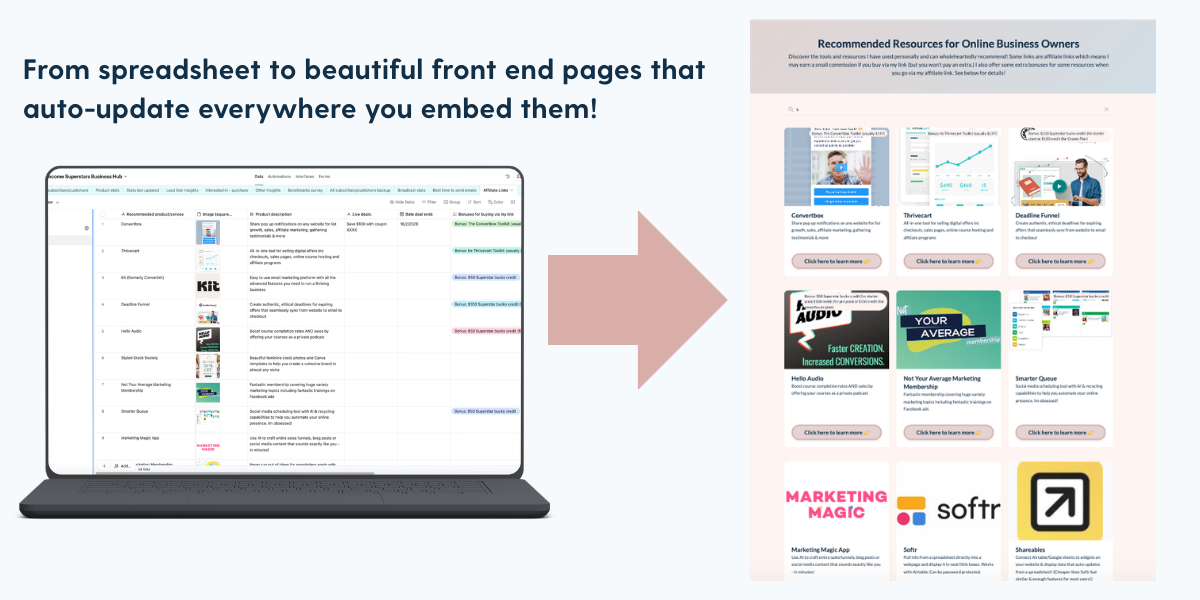
A cheaper (and more user friendly) version of tools like Softr and SpreadSimple that helps you create beautiful, auto-updating pages from a spreadsheet.
In this blog post, I’ll share 7 fun ways to use Shareables in your business to save time, build social proof, sell more of your own offers and make more affiliate commissions
First, what is Shareables?
Shareables is a new tool I found recently that replaces Softr or Spreadsimple and it’s currently on Appsumo with a great lifetime deal.
It takes data from Airtable/Google Sheets/Notion and uses it to auto-update a web page elsewhere – usually on your website or within your online courses.
It’s much faster than updating each page individually, especially when you have it in multiple places (like a resources guide that you might have inside every course.)
Imagine if you could just update a spreadsheet and your resources guide updated everywhere instantly?!
Even better, you can set up filters so that information only displays when it meets certain criteria. So for example, you could share live flash sales on a resources or shop page that automatically disappear when the deal is over!
Each of these strategies will take <10 minutes to set up…
So here are some fun ideas for using spreadsheet-website tools like Shareables…
1. Embed a student wins wall on your sales pages
Keep forgetting to update your sales pages with new testimonials?!
Automate it!
Create a forward facing wall of testimonials that pulls every new testimonial in automatically.
(Or you can have a filter to only pull testimonials you’ve approved if you prefer.)
Benefit: More social proof = more sales. Plus you just saved yourself some time!
2. Create an easy to shop offers page
Got a lot of offers and want people to be able to filter based on topic, goal, price etc?
Create a shop page where students can use a search function or filters to find what they’re looking for!
Benefit: easier to shop = more sales. Plus you can embed this inside all your courses too so that your most engaged customers can browse other offers!
3. Create an auto-updating BFCM page
Do you share a round up page for BFCM but get fed up logging in every day to add the deals that went live that day and removing the ones that expired?
You can add start and end dates and then create a filter so that only live deals show on the front end!
You can do this during any sales period e.g. Amazon Prime sales, Back to School sales, January sales etc…
Benefits: Massive time saver plus more affiliate sales!
4. Create a fun advent calendar flash sale event
Want to try a flash sale where you share a different deal every day/week?
Use Shareables to create your front end page so that only the deal of the day is showing on your event page!
Benefits: A new way to do a flash sale that feels unique and fun. Hopefully more sales!
5. Embed your affiliate links inside all your courses
Create a resources page which you can embed straight into every course.
That way your students can see all your recommended resources and you can earn more affiliate commissions.
It takes a few minutes to set up and now if you change a recommendation of a link breaks, you can fix it across all your courses in seconds.
I’ve also set mine up to show live flash sales which auto-disappear when the deal has ended.
Benefits: More affiliate commissions plus save yourself a LOT of time!
6. Use it to host bundles and summits – with a lot less faff!
Remove some of the most time consuming parts of running a bundle or summit.
Your collaborators submit their info into a form. It instantly displays on your sales page and the redemption page.
Benefits: Running events don’t have to be time consuming with a tool like this. Running events = very rapid list growth plus setting yourself up as an authority in your niche.
7. Embed related products into blog posts
Create databases for specific topics with your favourite affiliate resorces or your own related offers.
You can them embed this on your blog posts.
Now if you find a new resource or create a new product, you can just add it to your database and watch it instantly show up across your website!
Benefits: More organic sales of your own offers and affiliate offers
How to get a lifetime deal for Shareables…
Hopefully this blog post has helped you generate some ideas that will save you a lot of time!
If you want to try these strategies out, I recommend either signing up to Shareables direct (very low cost subscription, much cheaper than Softr or SpreadSimple.)
Or if you prefer a lifetime deal, you can grab it on Appsumo for a one off fee from $59.
I went for tier 3 with 100 widgets as I can see me using this a LOT in my business.
Remember Appsumo deals are temporary. I’ve missed out on a lot of them by waiting too long before and then kicked myself when I then had to get a monthly subscription instead!
Read next: Enjoyed this article? You might enjoy 21 Creative Ways to Use Convertbox in your business
See Shareables in action…
Below is an affiliate resource page I created in Shareables which took about 10 minutes to set up. I can now embed it everywhere including inside all my courses!
